New Features Changelog: November 16, 2026
A redesigned Sitter Availability Calendar, expanded Membership management, Sitter Tips & Tricks and more flexible Multi-Date Bookings: here’s everything in the latest Sittysites release.

On this page
- Redesigned Sitter Availability Calendar
- Expanded Membership Management
- Sitter Tips & Tricks
- More Flexibility for Multi-Date Bookings
- Improved Job Broadcasting & Booking Bonuses
- Improved Sitter Selection & Booking Experience
- Client Guides & Help Resources
- Expanded Flex Configuration Options
- Additional Platform Improvements
- Thank You
We’re back with another exciting round of Sittysites updates! This week’s release brings exciting improvements to Sitter scheduling, Membership management, Family insights, and booking flexibility, along with enhancements designed to make your agency’s day-to-day operations easier.
Redesigned Sitter Availability Calendar
We’re especially excited about this one!
We’ve introduced a completely redesigned Sitter Availability Calendar, making it easier for Sitters to manage their schedules and for Admins to see caregiver availability.
The new calendar features a monthly view where Sitters can manage their available hours by day, creating a much more intuitive scheduling experience.
A few highlights
- Improved Calendar Experience: A refreshed, easier-to-use calendar for managing availability.
- Booked Appointments: Existing appointments automatically appear on the calendar. Click a booked time to open the appointment details.
- More Accurate Availability: The calendar reflects actual appointments, including overnight bookings that extend into the following morning.
We’ve also redesigned the Weekly Booking Schedule Picker! Families can now select individual days of the week, add multiple time blocks per day, and use a convenient Copy Monday to All Weekdays option to quickly create recurring schedules.
These updates make managing both simple and complex scheduling needs easier than ever!
Expanded Membership Management
We’ve introduced two exciting improvements to help agencies manage Membership Plans and recurring payments more effectively.
Declined Membership Renewals
- When a Membership renewal payment fails, it now appears in your Pending Payments area.
- Admins can retry the payment directly from the portal, including the option to use a different payment method.
- If a Membership has lapsed because of an unpaid renewal, it will restart from the date the payment is successfully processed.
Membership Changes Dashboard
You’ll also notice a new Membership Changes box on your Admin Dashboard! This gives you visibility into Families who have scheduled changes to their Membership Plans, including upcoming cancellations, upgrades, and downgrades.
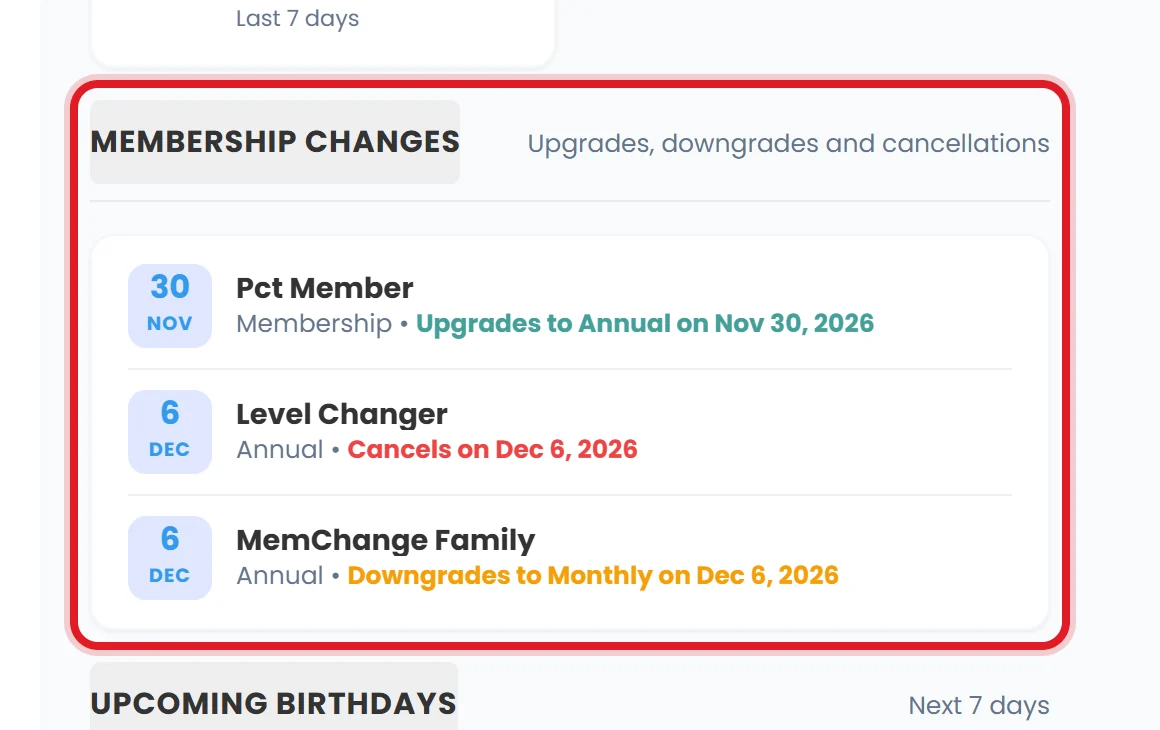
These changes are displayed ahead of the next renewal, helping you anticipate changes to your recurring revenue.
Bonus! Admins will now receive an email notification when a Family turns off automatic Membership renewal.
Sitter Tips & Tricks
We’re introducing a new way for Sitters to share helpful information about the Families they work with!
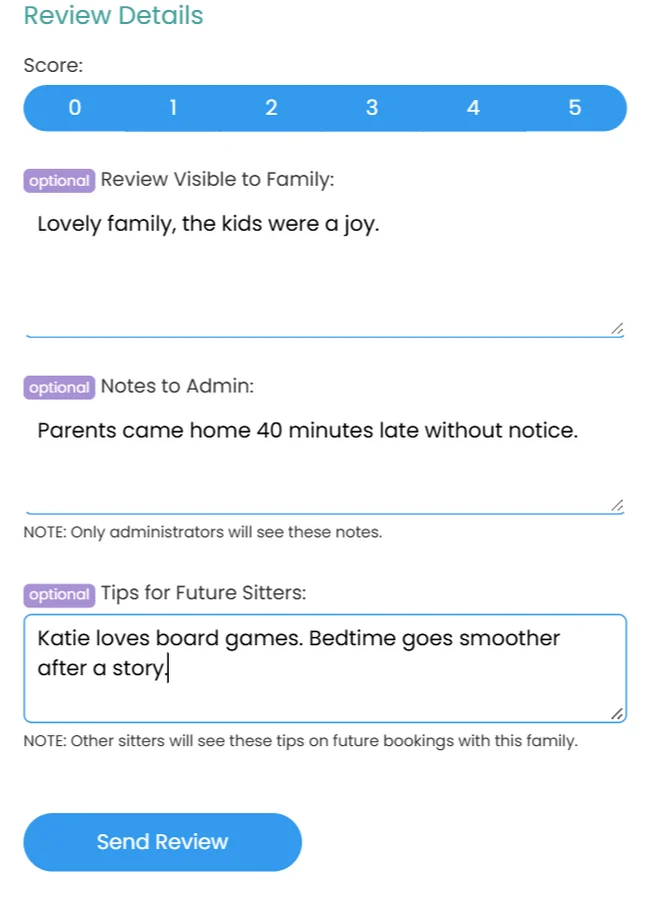
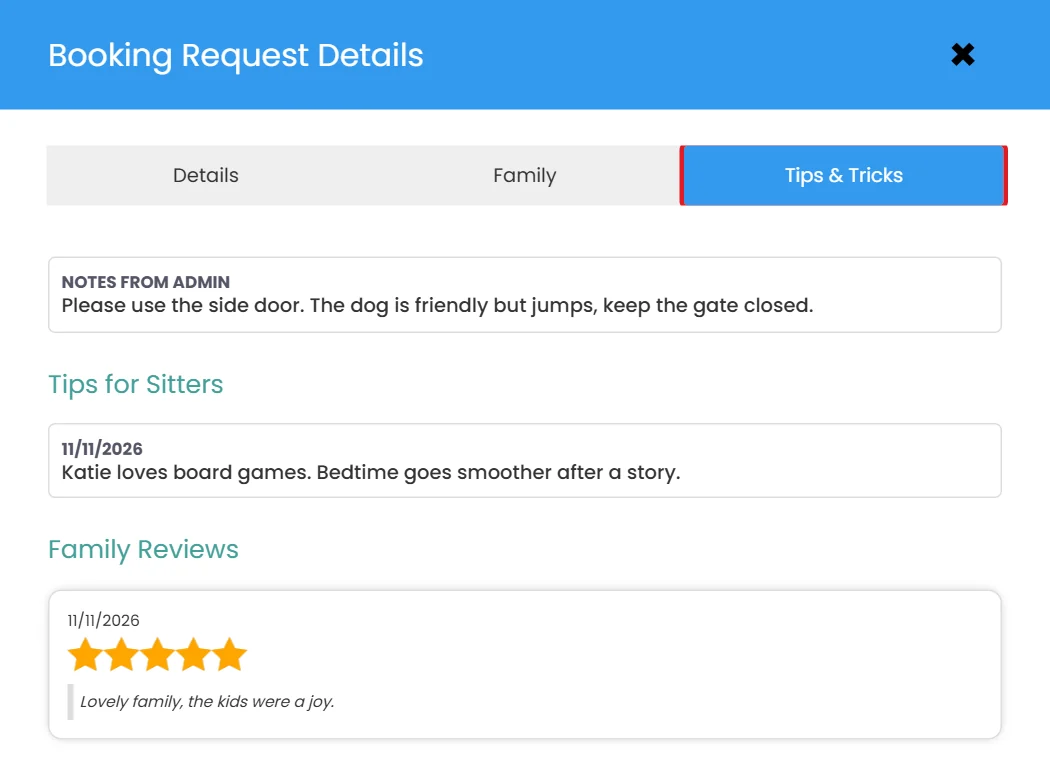
When reviewing a Family, Sitters can now leave Tips & Tricks for other Sitters, sharing insights that may make future appointments easier.
For example, a Sitter might share a child’s favorite activities, helpful bedtime routines, or other details that could make the next caregiver’s experience even better.
Sitters can review these tips before accepting a job with that Family, helping them feel more prepared and confident.
We’ve also added more controls
- Private Admin Notes: Sitters can leave notes that are visible only to your Admin team.
- Sitter Review Visibility: Agencies can choose whether Sitters can see reviews left by other Sitters.
- Admin Oversight: Admins can edit Tips & Tricks and hide reviews when appropriate.


This is a great way to encourage collaboration among your caregivers while maintaining agency oversight.
More Flexibility for Multi-Date Bookings
We’ve made several additional improvements to Multi-Date Bookings!
Remove a Single Date
Admins can now remove one individual date from an existing Multi-Date Booking without needing to cancel or recreate the entire booking. Families can also make this change when Client Editing is enabled for their agency.
When a date is removed:
- The assigned Sitter is released from that date.
- Any applicable booking fee difference is credited to the Family.
- Everyone involved receives a notification about the change.
Improved Admin Management
Admins can now assign a Sitter to a Multi-Date Job in one step, and Job Lists display how many dates already have coverage.
These improvements make managing changing schedules easier while keeping everyone informed.
Improved Job Broadcasting & Booking Bonuses
We’ve added another helpful improvement to the way Admins communicate available jobs to Sitters.
When re-broadcasting a job, Admins can now include an optional message to provide additional context or encourage Sitters to consider the opportunity. If the booking includes a bonus, the message will automatically be pre-filled with the bonus information, which you can adjust as needed.
We’ve also added visibility into who added a Booking Bonus, giving your team a clearer record of booking changes.
Improved Sitter Selection & Booking Experience
We’ve continued refining the booking process for Families and Admins!
- Smarter Sitter Selection: When adding a Sitter to an existing booking, Families will only see Sitters available for every upcoming date.
- Updated Sitter Profile Cards: Improved profile cards make it easier to review caregiver information during the booking process.
- Sitter Contact Information: Families can now see their confirmed Sitter’s phone number directly within appointment details.
- Branded Job Sharing: Public job link previews now feature your agency’s own logo and colors for a more professional, branded experience.
These improvements create a more intuitive booking experience for everyone involved.
Client Guides & Help Resources
We’re continuing to expand the resources available to help you and your team navigate Sittysites!
In addition to our existing Staff How-To Guides, we’re introducing a new collection of Client Guides designed specifically for agency owners and administrators.
Our first guide walks agencies through granting Sittysites access to their Apple Developer account, with additional resources to come.
Expanded Flex Configuration Options
For agencies using our Flex configuration, we’ve introduced additional customization options!
Add-ons can now be configured with different billing structures
- Per-hour charges
- Per-appointment charges
- One-time charges per booking
We’ve also added support for overtime surcharges. These improvements offer greater flexibility for agencies with more complex or customized pricing structures.
Additional Platform Improvements
We’ve also made several smaller improvements throughout Sittysites.
- Calendar Accuracy: Older blocked calendar times without corresponding appointments are automatically cleared.
- Booking Details: Improved the display of booking rates and estimated totals.
- Payments: Additional safeguards help prevent small unpaid balances for agencies using direct Sitter payouts.
- Direct Bookings & Shared Links: Resolved issues affecting pending booking details and shared Sitter links.
Thank You for Your Continued Partnership!
We’re incredibly grateful for the thoughtful feedback, ideas, and encouragement we continue to receive from our Partners.
Your suggestions play such an important role in shaping Sittysites, and we love seeing new features come to life that help agencies operate more efficiently while maintaining the personal relationships that make this industry so special.
Thank you for continuing to grow with us!